Hacker Newsnew | past | comments | ask | show | jobs | submitlogin

I have to disagree. There’s nothing like column view for windows. The “address” bar in the windows file manager is very useful, though. I’ll give you that. But other than that, I find Finder better. Finder also has tabs (I don’t know if windows copied this, I haven’t used windows since windows 8).


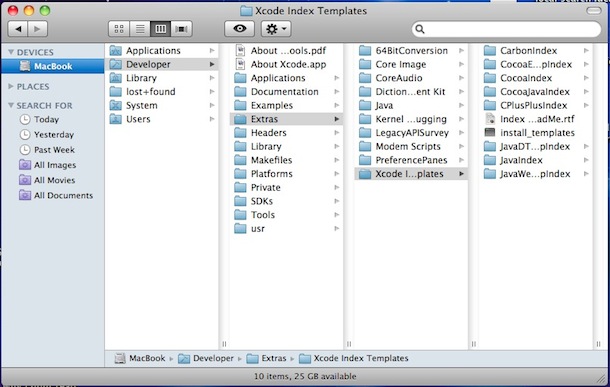
> There’s nothing like column view for windows.

Yes there is. Only it's called “Details” view (if I understood what you meant correctly.)

Press the [Alt] key to make Explorer’s menu appear, then View, then Details. IIRC. HTH!


What kind of column view are you wanting? I've been more or less happy with the columns offered by the "details" "icon size" option.


I don’t use windows, I mean the column view in Finder:

https://osxdaily.com/wp-content/uploads/2010/02/mac-os-x-fin...

Browsing the full path of a file using columns is extremely useful (at least to me as a developer).


Finder has a quasi address bar via “go to”, although it's a bit hidden


Yeah, I use it quite a bit. But it’s ugly tbh.


Guidelines | FAQ | Lists | API | Security | Legal | Apply to YC | Contact

Search: